
Capture in one click
Open the extension on your source page and let CopyPaste prepare it for Elementor.
Capture any ChatGPT Site in Chrome. Paste it into Elementor. Keep building—without starting over.
Free to try One-time license No code required
One tiny extension. One massive shortcut.
Move from an AI-generated concept to an editable WordPress page in a workflow that feels almost unfairly simple.
Open the extension on your source page and let CopyPaste prepare it for Elementor.
Use the keyboard shortcut you already know. No export maze, no manual reconstruction.
Continue refining your page inside Elementor and hand it off in a familiar WordPress workflow.
Nine short steps. No rebuilding every section by hand.
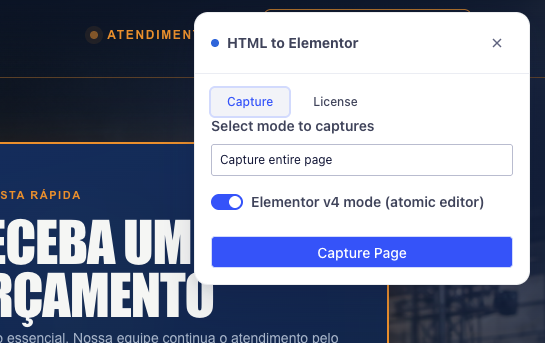
Reload the source site, open CopyPaste and click Capture Page. Choose Elementor v4 mode when working with the Atomic Editor.
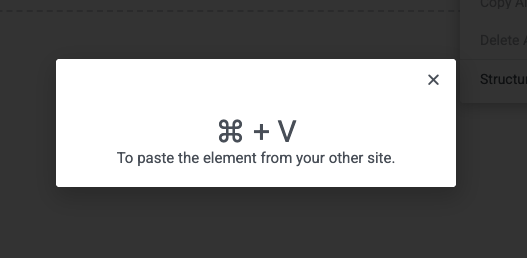
Right-click the editing area, choose Paste from other site, then press Ctrl + V—or Cmd + V on a Mac.
Add the extension from the Chrome Web Store. Your first 3 website conversions are free.
Open the ChatGPT Site you want to move and refresh the page after installing the extension.
Click the CopyPaste Elementor icon in your Chrome toolbar.
Choose your preferred Elementor mode, then click “Capture Page.”
Open WordPress, launch Elementor and create a new blank page.
Using Elementor Free? Install Advanced Animation so custom CSS can be added through its custom block.
Right-click inside the Elementor canvas and select the paste option.
Use Ctrl + V on Windows or Cmd + V on macOS.
Give CopyPaste a moment to rebuild the captured page inside Elementor.
Start with 3 free website conversions. When CopyPaste earns its place in your workflow, unlock the full version for one simple price.
One-time purchase
Pay once. Unlock the complete extension.
Try CopyPaste freeNo payment required for your first 3 conversions.Everything you need to know before turning your first ChatGPT Site into an Elementor page.
CopyPaste captures a website in Chrome and turns it into content that can be pasted directly into the Elementor editor. It is especially useful for moving websites created with ChatGPT Sites into WordPress, where you can keep editing them visually.
Yes. You can install the extension and convert up to 3 websites for free. No paid license is required for the trial.
The full version costs US$ 19.99. It unlocks CopyPaste after your 3 free website conversions.
No. CopyPaste can work with Elementor Free. For pages that use custom CSS, we recommend installing the free Advanced Animation plugin, which provides a custom block for adding CSS in the block editor. Elementor Pro users can rely on their existing custom CSS features.
Yes. The workflow is the same: use Ctrl + V on Windows and Cmd + V on macOS when Elementor asks you to paste.
Reloading lets Chrome activate the extension on the page you want to capture. It is a quick one-time step for any tab that was already open during installation.
Yes—that is the point. Once the page is pasted into Elementor, you can continue adapting its content and design with the Elementor workflow you already know.
Bring your ChatGPT Sites into Elementor and spend your time refining, not rebuilding.
Start with 3 free conversions